Multinode Check


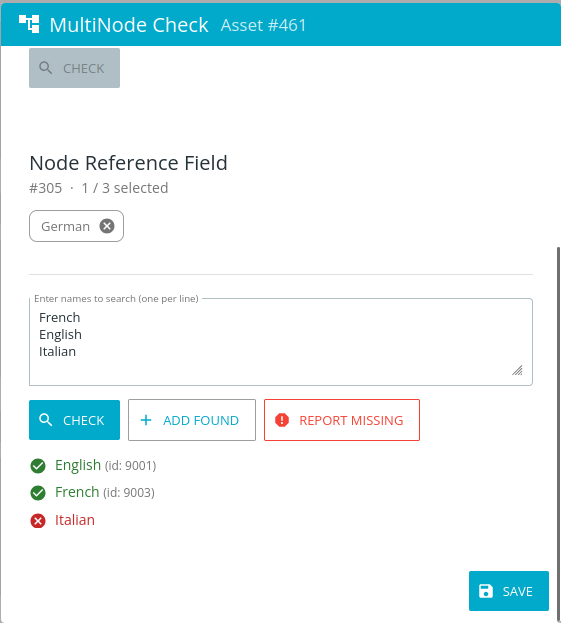
This plugin offers the option to add multiple nodes to NodeReference-Infofields at the same time. Missing values can be reported to preconfigured admins.
Properties
To be configured in {home}/appserver/conf/custom.properties
multinode.license
type: String, required: yes, default: -
The license key for the plugin (product: multinode), provided by brix.
multinode.infofieldIds
type: List of Long, required: yes: , default: -
List of infofield IDs, comma separated, which can be edited in the plugins. Must be NodeReference-infofields
multinode.missingValuesReportEmail
type: String, required: yes, default: ""
The email where reports for missing values will be sent to.
multinode.missingValuesReportMessage
type: String, required: yes, default: ""
The content of the email that will be opened in the email handler of the reporter. Available placeholders: {assetId}, {fieldId}, {fieldLabel}, {missingValues}
example: multinode.missingValuesReportMessage==Hello,\n\nThe following nodes could not be found for field "{fieldLabel}":\n\n{missingValues}\n\nPlease add them or verify the names.\n\nKind regards
Compatibility Matrix
| Multinode Plugin | CELUM (min. version) |
|---|---|
| 1.0 | 6.20.0 |
| Nova Plugin | CELUM (min. version) | Backend Plugin (min. version) |
|---|---|---|
| 1.0.0-6.20.0 | 6.20.0 | 1.0 |
Screenshots
Release Notes
1.0
Released: 2026-04-30
- Initial Version
© brix Solutions AG