---
title: 'Metadata Mapper'
url: 'https://doc.brix.ch/celum_extensions/metadata_mapper'
markdown: 'https://doc.brix.ch/celum_extensions/metadata_mapper.md'
lang: en
date: '2026-10-26'
description: 'Technical documentation for the CELUM Extension "Metadata Mapper" – Software developed by brix'
taxonomy:
category:
- docs
---
[](#)
[ Welcome ](https://doc.brix.ch/) [ CELUM Extensions ](https://doc.brix.ch/celum_extensions) Metadata Mapper
# Metadata Mapper

Writes file metadata (such as IPTC, EXIF or XMP) from the original file to CELUM information fields. In contrast to the core functionality, this plugin supports multiple candidate sources for one field and is able to transform the value in a multitude of ways before writing it to an information field, for example use the date that a photo was taken and convert it to a keyword of the appropriate season (e.g. *DateTaken* is 2017-07-07 -> add keyword *Summer* to the information field *Season*)
Note that the mapping can only take place when the asset has an asset type and has been released from the upload basket.
> > > > > > It's recommended to set `thirdparty.eventbus.AsyncEventBus.optimizedSynchronizationStrategy=true` to batch events by object type instead of event type.
#### Table of Contents
- [Properties](#properties)
- [Bean Configuration](#bean-configuration)
- [A note on shading](#a-note-on-shading)
- [Compatibility Matrix](#compatibility-matrix)
- [Release Notes](#release-notes)
## Properties
To be configured in {home}/appserver/conf/custom.properties
##### metadataMapper.license
> type: String, **required: yes**, default: -, since v2.5
The license key for the plugin (product: metadataMapper), provided by *brix*.
##### metadataMapper.autoSetAssetType
> type: long, required: no, default: 0
Automatically set this asset type when mapping the metadata.
##### metadataMapper.reinitNodeIds
> type: list of long (comma separated), required: no, default: -
If you install the Metadata Mapper after you've already uploaded some asset, you can configure the IDs of all root nodes that should be re-initialized (i.e. apply the mappings all assets within those nodes) through Administration > System Tasks > Other > Metadata Mapper Re-Initializer
##### metadataMapper.reinitFilterExpression
> type: string, required: no, default: -
A valid [Search Util 2](https://docs.brix.ch/celum_extensions/search_util_2) expression to filter the assets that should be re-initialized. This filter is applied in addition to the `metadataMapper.reinitNodeIds` filter.
## Bean Configuration
Because the Metadata Mapper can be quite complex, the main configuration is not done through properties but rather with Spring Beans. The Metadata Mapper expects an XML to be located in `{home}/appserver/spring/metadataMapper.xml`
Let's consider the following example where we try to map the creator and the creation date:
```xml
```
The main player here is the *MetadataMapping*-class, which needs at least *fields* and *mapping* to be configured
- **fields**: comma separated list of possible candidates in the format *GROUP:TAG* (e.g. `XMP:Title` - to find your tags, `exiftool -g -j yourfile.jpg` can be helpful). Uses the **first** non-empty metadata field it finds (unless the property **stopAfterFirstValue** is set to false). Alternatively you can also pass a **fileProperty** key to tap into the file properties that CELUM extracts. Note that for videos, `mediainfo` may be used instead of `exiftool` - the keys retain their structure (e.g. `General:Movie_name`).
In the NOVA-UI, there's a button that does the `exiftool -g -j yourfile.jpg` for you:
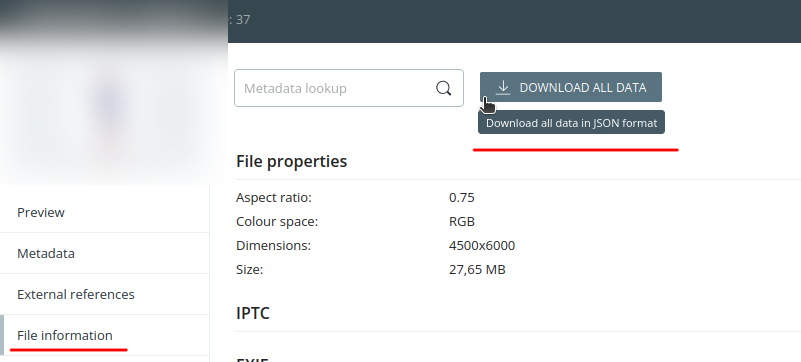
- **mapping**: The mapping bean that takes the extracted value and applies it to an information field. Most mappers also take a *value transformer* to transform the received value before applying it. There are **a lot** of different mappers, so they are not explained here in detail. We recommend that you use an IDE and import the jar as a library - this enables auto-complete of all `ch.brix.metadataMapper.lib.mappingTypes` and their associated `nodeFinder` and `valueTransformer`.
Mappings in the `infofield` sub-package share some **common booleans**:
- **overwrite**: whether to overwrite existing values with the incomming one (default is *true*)
- **clearOnEmptyValue**: whether to clear the information field when receiving an empty string (default is *false*)
- **doUpdateCheck**: whether to check if the information field already contains the target value (default is *false*). Note that this may result in an asset reload for cases where the information field is not present yet (performance implications).
- **updateOnNewVersion** whether to update the mapped value when a new version is added (default is *false*)
- **splitString** split the received value by this string and map multiple times (useful for keywords)
- **joinString** - the same but in reverse, things like `IPTC:Keywords` may occur multiple times, but you want them in a single textarea, e.g. joined using `,`
- **assetTypes** only apply this mapping for a list of asset type IDs, e.g. "10050,10051"
### Examples
In this case we want to automatically populate the *Year* noderef with the year that the photo was taken in. Note the use of both the *value transformer* which converts the date to a year and the *node finder* which finds the ID of the appropriate *year*-keyword or creates it if necessary.
```xml
```
Here's another example (the one with the seasons from the intro) where we don't use a *node finder*, as there are only 4 valid values.
```xml
```
Here's a more involved example there we take a bunch of keywords, split them with a delimiter, and then go look for matching nodes (and create them if necessary)
```xml
```
## A note on shading
All *mappers*, *value transformers* and *node finders* are located in the generic package *ch.brix.lib*. These however get shaded when included in any project to \_ch.brix.ARTIFACT*ID.lib* (so *ch.brix.metadataMapper.lib* in this case) in order to avoid conflicts with other plugins that may use the same libs at different version levels. When developing the mappings in your IDE, we recommend that you import the compiled jar as a library (Intellij: Project Settings > Libraries > + > Java, select the jar).
## Compatibility Matrix
| metadataMapper | CELUM (min. version) |
|---|---|
| 1.0 | 5.11.0 |
| 1.1 | 5.12.0 |
| 1.2 | 5.12.2 |
| 1.3 | 5.12.4 |
| 2.0-2.4 | 5.13.3 |
| 2.5-2.6 | 5.13.4 (tested up to 6.19) |
| 2.7+ | 6.20 (tested up to 7.1) |
## Release Notes
#### 1.0
> Released 2016-03-18
- Initial Version
#### 1.1
> Released 2016-04-12
- Fixed shading configuration
#### 1.2
> Released 2016-03-18
- Added support for versions
- Added initialization task
#### 1.3
> Released 2018-02-09
- Updated mapping library to support new mapping types
- Fixed mapping not triggering when upload happens via SDK
- Various improvements regarding multi-threading
#### 2.0
> Released 2018-03-22
- Refactoring of mappers to differentiate between those that need to wait for file metadata to arrive and those who don't
#### 2.1
> Released 2018-07-24
- Added support for the async SDK events
#### 2.2
> Released 2018-09-07
- Added support custom mappings (interface)
#### 2.3
> Released 2018-09-12
- Updated mapping library to support new mapping types
#### 2.4
> Released 2018-11-29
- Added support for original file mappings
#### 2.5
> Released 2019-01-19
- Added license
- CELUM 6.4 (19.10) compatible
#### 2.6
> Released 2021-09-27
- Fixed `fields` property not having a guaranteed order, rendering the "first of..." promise meaningless
#### 2.7
> Released 2025-02-05
- Compatibility with CELUM 6.20
#### 2.8
> Released 2025-10-15
- Chain metadata updates to reduce SDK calls (if the mapper implements the `Chainable` interface)
#### 2.9
> Released 2026-02-09
- Add `metadataMapper.reinitFilterExpression` property to re-initialize assets matching a filter expression
[ ](https://doc.brix.ch/celum_extensions/sort_and_rename) [](https://doc.brix.ch/celum_extensions/duplicate_check)
---
## Navigation
- Parent: [CELUM Extensions](https://doc.brix.ch/celum_extensions.md)
- Previous: [Batch Rename & Sort](https://doc.brix.ch/celum_extensions/sort_and_rename.md)
- Next: [Duplicate Check & Sync](https://doc.brix.ch/celum_extensions/duplicate_check.md)