---
title: 'Batch Search & Download'
url: 'https://doc.brix.ch/celum_extensions/batch_search_download'
markdown: 'https://doc.brix.ch/celum_extensions/batch_search_download.md'
lang: en
date: '2026-10-26'
description: 'Technical documentation for the CELUM Extension "Batch Search & Download" – Software developed by brix'
taxonomy:
category:
- docs
---
[](#)
[ Welcome ](https://doc.brix.ch/) [ CELUM Extensions ](https://doc.brix.ch/celum_extensions) Batch Search & Download
# Batch Search & Download

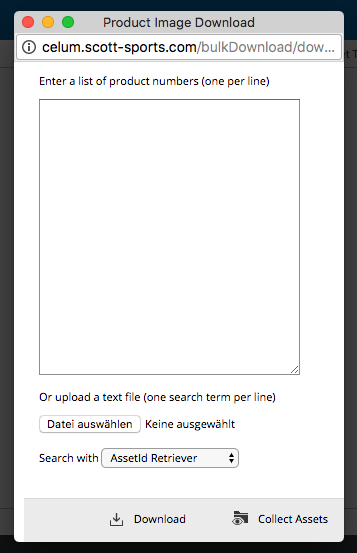
This extension is used for rapid downloading of all assets in the original format, based on a list of supplied asset names (e.g. part numbers of products). Alternatively, a node with all matching assets can be created instead. This node will be deleted after a defined time period. The way of matching assets may be specified in a custom method, so that a part of the name is sufficient to find assets. Before downloading or displaying of the node, a list of names for which no assets have been found is displayed. Different matchers can be specified per user group.
#### Table of Contents
- [Properties](#properties)
- [Example](#example)
- [Screenshots](#screenshots)
- [Compatibility Matrix](#compatibility-matrix)
- [Release Notes](#release-notes)
## Properties
To be configured in {home}/appserver/conf/custom.properties
##### bulkDownload.license
> type: String, **required: yes**, since 1.9, default: -
License key (delivered by brix Solutions AG).
##### bulkDownload.cleanupTask.maxCollectionAgeInMinutes
> type: number, **required: yes**, default: -
Maximum age in minutes of collections, created by BulkDownload, that are ignored by the Cleanup Task.
##### bulkDownload.collection.parentId
> type: long, **required: yes**, default: -
ID of the parent node of created collections.
##### bulkDownload.group.retriever.
> type: string, **required: yes**, default: -
Group-ID and name of asset retriever to use
One of:
- defaultAssetRetriever
- celumIdAssetRetriever
- exactNameAssetRetriever
- nameStartsWithAssetRetriever
- *Custom AssetRetriever* (bean ID, e.g. *myAssetRetriever*)
Custom retrievers need to implement the following interface:
```java
package ch.brix.bulkDownload.retriever;
public interface AssetRetriever {
SearchCollection getAssets(String[] identifiers, Credentials credentials, GroupConfig config);
}
```
reference it, either in a core-context.xml or just the root.xml
```xml
```
and name it in a message bundle using the bean ID `bulkDownload.myAssetRetriever=My Custom Retriever`
##### bulkDownload.group.downloadformat.
> type: long, **required: yes**, default: -
Group ID and ID of the downloadformat to use
##### bulkDownload.search.locale
> type: string, **required: yes**, default: -
Locale for the search in infofields are involved.
##### bulkDownload.privateMode.enabled=
> type: boolean, required: no, default: false
If enabled, a new created collection does not inherit permissions, but will have a specified role for the creating user.
##### bulkDownload.privateMode.roleId
> type: role id, required: no, default: -
If private mode enabled, specifies which role a creating user will have on a new created collection.
##### bulkDownload.goToCollection
> type: boolean, required: no, default: false
If true user will automatically be forwarded to the newly created collection.
## Example
*appserver/conf/custom.properties*
```ini
bulkDownload.cleanupTask.maxCollectionAgeInMinutes=5
bulkDownload.collection.parentId=16
bulkDownload.group.retrievers.14=defaultAssetRetriever,customAssetRetriever
bulkDownload.group.downloadformat.14=1
```
*appserver/spring/root.xml*
```xml
```
## Screenshots
## Compatibility Matrix
| bulkDownload | CELUM (min. version) |
|---|---|
| 1.0 - 1.4.5 | 5.11.4 |
| 1.5 - 1.9.3 | 5.12.4 |
| 1.9.4 - 1.15 | 5.13.3 |
| 1.20+ | 6.8 (tested up to 6.16) |
| 1.21 | 6.20 |
| 1.26 | 7.1 |
## Release Notes
#### 1.0
> Released 2016-04-15
Initial Version
#### 1.7
> Released 2018-06-25
ExactMatch and StartWith Asset-Retriever added
#### 1.9
> Released 2019-01-29
Added license
#### 1.12
> Released 2021-02-05
Private mode added
#### 1.13
> Released 2021-02-16
Go to collection property added
#### 1.14
> Released 2021-06-30
ThreadPooling for better performance
#### 1.15
> Released 2021-06-30
Table with progressed task in GUI on progress page
#### 1.21
> Released 2025-02-07
Compatibility with CELUM 6.20
#### 1.22
> Released 2025-02-18
Read content of text files on upload and write it in text input field
#### 1.23
> Released 2025-03-12
Search term mode feature
#### 1.26
> Released 2026-07-13
Compatibility with CELUM 7.1
[ ](https://doc.brix.ch/celum_extensions/asset_marker) [](https://doc.brix.ch/celum_extensions/asset_order)
---
## Navigation
- Parent: [CELUM Extensions](https://doc.brix.ch/celum_extensions.md)
- Previous: [Asset Marker](https://doc.brix.ch/celum_extensions/asset_marker.md)
- Next: [Asset Order](https://doc.brix.ch/celum_extensions/asset_order.md)