---
title: anura-table
url: 'https://doc.brix.ch/anura/webcomponents/components/table'
markdown: 'https://doc.brix.ch/anura/webcomponents/components/table.md'
lang: en
date: '2026-10-26'
description: 'Technical documentation for brix:anura webcomponents – Software developed by brix'
taxonomy:
category:
- docs
---
[](#)
[ Welcome ](https://doc.brix.ch/) [ brix:anura ](https://doc.brix.ch/anura) [ Anura Webcomponents ](https://doc.brix.ch/anura/webcomponents) [ Components ](https://doc.brix.ch/anura/webcomponents/components) anura-table
# anura-table
#### Table of Contents
- [Attributes](#attributes)
- [Variables](#variables)
- [Events](#events)
- [Slots](#slots)
- [Parts](#parts)
- [anura-col](#anura-col)
```html
```
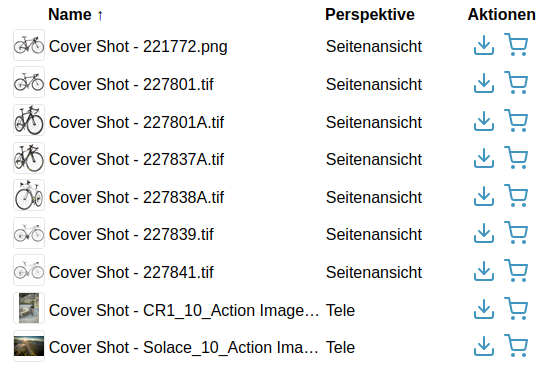
By default, the table has 3 columns (thumbnail, assetName, actions) and an `` at the bottom.
## Attributes
### adapter
> **required: yes**, live: no, default: -
With which adapter to talk to (for translations and suggestions)
``
### columns
> required: probably, live: on-load, default: `thumbnail,assetName,actions`
What columns to show. Note that this offers no way of customizing the columns -> **define [anura-col](#anura-col)s instead for more control**.
``
### search
> required: **when no *node* is provided**, live: yes, default: -
Which component the table should get its instructions from, e.g.:
- `anura-tree`
- `anura-searchbar`
- `anura-select`
You can combine multiple search components, e.g. `anura-tree,anura-searchbar`, which will be ANDed together. Depending on where they live, you may use a selector such as `aside > *`.
``
### node
> required: **when no *search* is provided**, live: yes, default: -
The content of which node that the table should display. This will cause the gallery to ask its *adapter* for the content of said node.
``
### sort
> required: no, live: yes, default: -
How the displayed assets should be sorted by default, ending in either `_asc` or `_desc`. The exact wording will depend on your *adapter*, e.g. `name_asc`. Known values:
- Bynder: `name, dateCreated, dateModified, datePublished`
- CELUM: `id, name, uploaddate, lastmodified, extension, assettype, score, original(name), (file)size, info_{id}`, default is `id`
- Sharedien: `relevance, file_name, system_import_date`, default is `relevance`
``
### page-size
> required: no, live: on-load, default: 50
How many assets should be displayed at once on a page.
``
### basket
> required: no, live: yes, default: -
Where an instance of `` can be found to collect assets in, e.g. `#my-basket`. Attempts auto-detection of `anura-basket`
``
### quick-download
> required: no, live: on-load, default: -
Which download format to use for the quick download button, e.g. `Original`. **NOT RECOMMENDED**, specifying nothing makes an download format selector appear.
``
### lightbox
> required: no, live: yes, default: creates one
Where an instance of `` can be found to display assets in, e.g. `#my-lightbox`. When none is provided or detected, a "blank" lightbox will be appended to the body. This can be prevented by passing `lightbox="false"`, in which case nothing will happen.
``
### buttons
> required: no, live: on-load, default: 'download,basket'
Which buttons to show in the `buttons` column, and in what order. Known values are `checkbox`, `download` and `basket` (requires [basket](#basket) to be set).
This is a top-level attribute (instead of on the `anura-col`) for consistency across other components.
``
### sticky-header
> required: no, live: yes, default: false
Whether the table header should be sticky when scrolling.
- `--table-stiky-offset` may be used to set a vertical offset for a sticky header
- `--table-header-color` should be set to the page's background color
``
### mobile-cards
> required: no, live: yes, default: true
Whether the table rows should expand to a card-like view on mobile for better legibility.
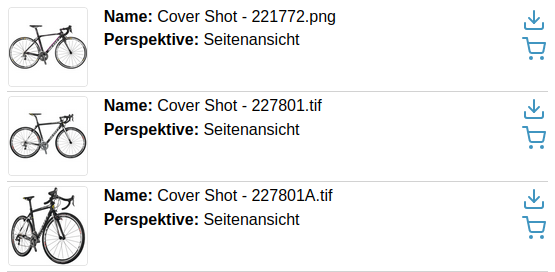
Note that this assumes (via `grid-template-columns`) that you have thumbnail- and action-columns enabled.
``
### mobile-labels
> required: no, live: yes, default: true
When using mobile-cards, display the former table headers as prefixes in the vertical view, e.g. "Perspektive: Seitenansicht" instead of just "Seitenansicht".
``
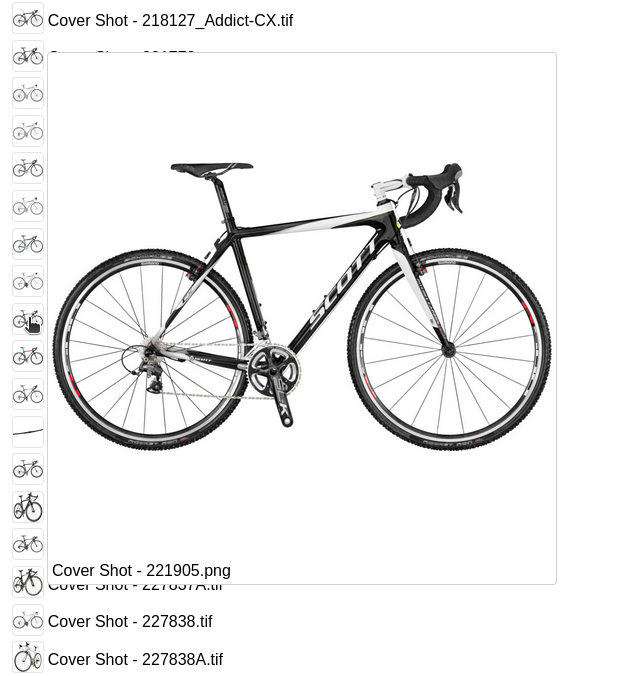
### hover-preview
> required: no, live: on-load, default: -
Whether to enable a hover-preview when the mouse hovers over the thumbnail.
- `--hover-max-width` and `--hover-max-height` default to 500px
``
### resizeable
> required: no, live: on-load, default: -
Whether to offer resize handles on columns. Note that the tracking may not match up 1:1 with the mouse movement due to the table layout being `fixed`.
``

## Variables
- `--thumbnail-border-radius` inherits from `--border-radius`
- `--thumbnail-background-color` defaults to transparent
- `--hover-color` the accent color for the row the mouse is hovering over
## Events
### assets-loading
> `{details: {node: nodeId, search: search-terms, keepContent: bool, pageRequest: pageRequest}}`
When the gallery is loading new assets, either through a node or a search request. A good time to clear counters and such.
### assets-loaded
> `{details: {total: totalCount, assets: AnuraAsset[], pageRequest: pageRequest}}`
When assets have been loaded (through whatever mechanism), informs other components (such as `anura-paginator`) about the total number of assets, the new assets themselves, as well as the pageRequest (contains current paging information).
### asset-added
> `{details: {asset: assetData, instance: trInstance}}`
When an individual `
` has been added to the table. Useful when you want to tweak something.
### paginate (inbound)
> pageNumber
Instruct anura-gallery to display the provided page number - used by `anura-paginator` to tell the gallery to advance to an arbitrary page. Note that the page number is currently not validated, so sending a non-existent page number may lead to undefined behaviour.
### asset-details
> `{details: {asset: assetData}}`
When an individual `anura-asset` has been clicked on. By default this triggers the `` unless `lightbox="false"` is set.
## Slots
- **header** - the header slot will appear before the table.
- **footer** - the footer slot will appear at the very end.
- **paginator** - configure your own paginator. Default is ``
```html
```
> > > > > When using the built-in components, the part selector might be `anura-gallery::part(paginator-button)`, but when you declare your own it changes to `anura-paginator::part(paginator-button)`, as it is no longer part of the gallery.
## Parts
```html
```
## anura-col
Just a configuration object to define column properties for `anura-table`
- **name** - what column to show. Built-in are `thumbnail`, `assetName` and `buttons` (formerly `actions`).
- Metadata columns are prefixed with `metadata-`, e.g. `metadata-description` to show a field called *description*. Depending on the adapter, you *may* need to preload these in the adapter ([CELUM](https://doc.brix.ch/dam/anura-webcomponents/adapters#infofields), [Sharedien](https://doc.brix.ch/dam/anura-webcomponents/adapters#load-properties)).
- **sort** - indicate that this field is sortable, and what its sort-key is (as this depends on your DAM), e.g. `sort="name"` will set the sort order to `name_asc` / `name_desc` when the column header is clicked. More fine-grained control is available through the **sort-asc** and **sort-desc** properties, e.g. `` (again, depending on your DAM).
- **title** - override the title (either built-in or fetched from the name of the metadata field on display)
- **title-*{locale}*** - override the title for a given locale, e.g. `title-en="Hi" title-de="Hallo"`
- **width** - how wide the column should be (any CSS unit), defaults to `auto`.
- **style** - for convenience, e.g. `text-align: end` for numbers
- **postprocessor** - name of a postprocessor that should be applied to the cell content. Known implementations:
- `markdown` - render the cell's text as [Markdown](https://daringfireball.net/projects/markdown/syntax)
- `date` - treat the cell as a date and format it (depends on your DAM) - reads an attribute `date-format` which must contain a valid format, default is `yyyy-mm-dd HH:MM:ss`
- `bytes` - if you need to control how the file size is formatted - reads an attribute `decimals` controls the decimal precision, e.g. 2 => 2.47 MB, 0 => 2 MB, default is 2
- `link` - scans plain text for possible hyperlinks (https?://..., e-mail address, international telephone number) and converts them to real hyperlinks
### Example
```html
```
### String interpolation
If you want to customize the content of a particular ``, you have full access to the string interpolation features, e.g. show an icon in front of the asset name based on a checkbox:
```html
${asset.name}
```
[ ](https://doc.brix.ch/anura/webcomponents/components/slider) [](https://doc.brix.ch/anura/webcomponents/components/text)
---
## Navigation
- Parent: [Components](https://doc.brix.ch/anura/webcomponents/components.md)
- Previous: [anura-slider](https://doc.brix.ch/anura/webcomponents/components/slider.md)
- Next: [anura-text](https://doc.brix.ch/anura/webcomponents/components/text.md)
 ${asset.name}