---
title: anura-map
url: 'https://doc.brix.ch/anura/webcomponents/components/map'
markdown: 'https://doc.brix.ch/anura/webcomponents/components/map.md'
lang: en
date: '2026-10-26'
description: 'Technical documentation for brix:anura webcomponents – Software developed by brix'
taxonomy:
category:
- docs
---
[](#)
[ Welcome ](https://doc.brix.ch/) [ brix:anura ](https://doc.brix.ch/anura) [ Anura Webcomponents ](https://doc.brix.ch/anura/webcomponents) [ Components ](https://doc.brix.ch/anura/webcomponents/components) anura-map
# anura-map
#### Table of Contents
- [Attributes](#attributes)
- [Variables](#variables)
- [Events](#events)
- [Slots](#slots)
- [Parts](#parts)
```html
```
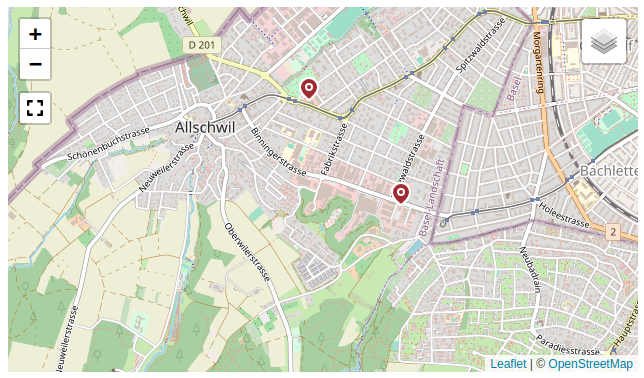
Displays a map, with geolocated assets as marker pins. This requires that your DAM has geo-capable metadata fields, in order to perform the "is in area" query (i.e. only Sharedien for now).
This component is a **hybrid** between a content- and a search-component, as the viewport displays assets **and** acts as a search source (e.g. has a `value`).
It is based on the wonderful [leafletjs.com](https://leafletjs.com).
> > > > therefore, this component has **dependencies on unpkg.com/leaflet\*** (i.e. an internet connection).
> > > >
> > > > this package is **not** included in the `anura-components` file for this reason - you need to `` it separately.
## Attributes
### adapter
> **required: yes**, live: no, default: -
With which adapter to talk to (for translations and suggestions)
``
### source
> required: **yes**, live: yes, default: -
Which metadata field contains the geolocation information.
``
### search
> required: no, live: yes, default: -
Which component the table should get its instructions from, e.g.:
- `anura-tree`
- `anura-searchbar`
- `anura-select`
You can combine multiple search components, e.g. `anura-tree,anura-searchbar`, which will be ANDed together. Depending on where they live, you may use a selector such as `aside > *`.
``
### sort
Inherited, but it has **no meaningful effect** (because assets are displayed at their location on the map).
### page-size
> required: no, live: on-load, default: 50
How many assets should be displayed at once on a page. In contrast to other components, it is recommended that you set this to something big, as the map will paginate internally until all assets are loaded.
``
### basket
> required: no, live: yes, default: -
Where an instance of `` can be found to collect assets in, e.g. `#my-basket`. Attempts auto-detection of `anura-basket`.
``
### lightbox
> required: no, live: yes, default: creates one
Where an instance of `` can be found to display assets in, e.g. `#my-lightbox`. When none is provided or detected, a "blank" lightbox will be appended to the body. This can be prevented by passing `lightbox="false"`, in which case nothing will happen.
``
### center
> required: no, live: yes, default: `46.801111,8.226667`
What the default center of you map should be, e.g. `47.55966,7.59551`
``
### zoom
> required: no, live: yes, default: 8
What the default zoom level should be (may depend on your choice of [layers](#layers)).
``
### layers
> required: no, live: yes, default: osm
What map layers should be made available for selection (comma separated). Known layers:
- osm - Open Street Map
- osm-topo - Open Street Map, topological view
- swisstopo - Official Swiss map by Swisstopo (only covers Switzerland)
- swisstopo-mono - same as above, but monochrome
- swissimage - Official Swiss satellite imagery (only covers Switzerland)
Note that Leaflet defaults to the last one to be the active one for some reason.
``
### fullscreen
> required: no, live: on-load, default: true
Whether to offer a fullscreen button on the map.
``
### value (read-only)
The current viewport of the map, e.g. `48.253941,4.515381x45.305803,11.942139` read as `top-left x bottom-right` coordinates.
## Variables
- `--marker-fill-color` inherits from `--button-color`
- `--marker-stroke-color:` inherits from `--button-font-color`
## Events
### change
Regular change event, when the map viewport changes (moved, zoomed).
### assets-loading
> `{details: {node: nodeId, search: search-terms, keepContent: bool, pageRequest: pageRequest}}`
When the gallery is loading new assets, either through a node or a search request. A good time to clear counters and such.
### assets-loaded
> `{details: {total: totalCount, assets: AnuraAsset[], pageRequest: pageRequest}}`
When assets have been loaded (through whatever mechanism), informs other components (such as `anura-paginator`) about the total number of assets, the new assets themselves, as well as the pageRequest (contains current paging information).
### asset-added
> `{details: {asset: assetData, adapter: adapter, dom: asset-instance}}`
When an asset has been added to the map. Useful when you want to tweak something.
### asset-selection
> {details: selectedAssets}
When a change to the [selected assets](https://doc.brix.ch/anura/webcomponents/components/asset#asset-select) occurs and the component updates its `selected` attribute.
### asset-details
> `{details: {asset: assetData}}`
When an individual `anura-asset` has been clicked on. By default this triggers the `` unless `lightbox="false"` is set.
## Slots
- **header** - the header slot will appear before the table.
- **footer** - the footer slot will appear at the very end.
- **asset** - configure your own asset. Default is ``
```html
```
## Parts
```html
```
[ ](https://doc.brix.ch/anura/webcomponents/components/lightbox) [](https://doc.brix.ch/anura/webcomponents/components/number)
---
## Navigation
- Parent: [Components](https://doc.brix.ch/anura/webcomponents/components.md)
- Previous: [anura-lightbox](https://doc.brix.ch/anura/webcomponents/components/lightbox.md)
- Next: [anura-number](https://doc.brix.ch/anura/webcomponents/components/number.md)