---
title: anura-lightbox
url: 'https://doc.brix.ch/anura/webcomponents/components/lightbox'
markdown: 'https://doc.brix.ch/anura/webcomponents/components/lightbox.md'
lang: en
date: '2026-10-26'
description: 'Technical documentation for brix:anura webcomponents – Software developed by brix'
taxonomy:
  category:
    - docs
---

[](#) 

  [ Welcome ](https://doc.brix.ch/)     [ brix:anura ](https://doc.brix.ch/anura)     [ Anura Webcomponents ](https://doc.brix.ch/anura/webcomponents)     [ Components ](https://doc.brix.ch/anura/webcomponents/components)      anura-lightbox    

# anura-lightbox

#### Table of Contents

- [Attributes](#attributes)
- [Slots](#slots)
- [Parts](#parts)
- [Variables](#variables)

Full-screen component to view bigger previews and asset metadata.
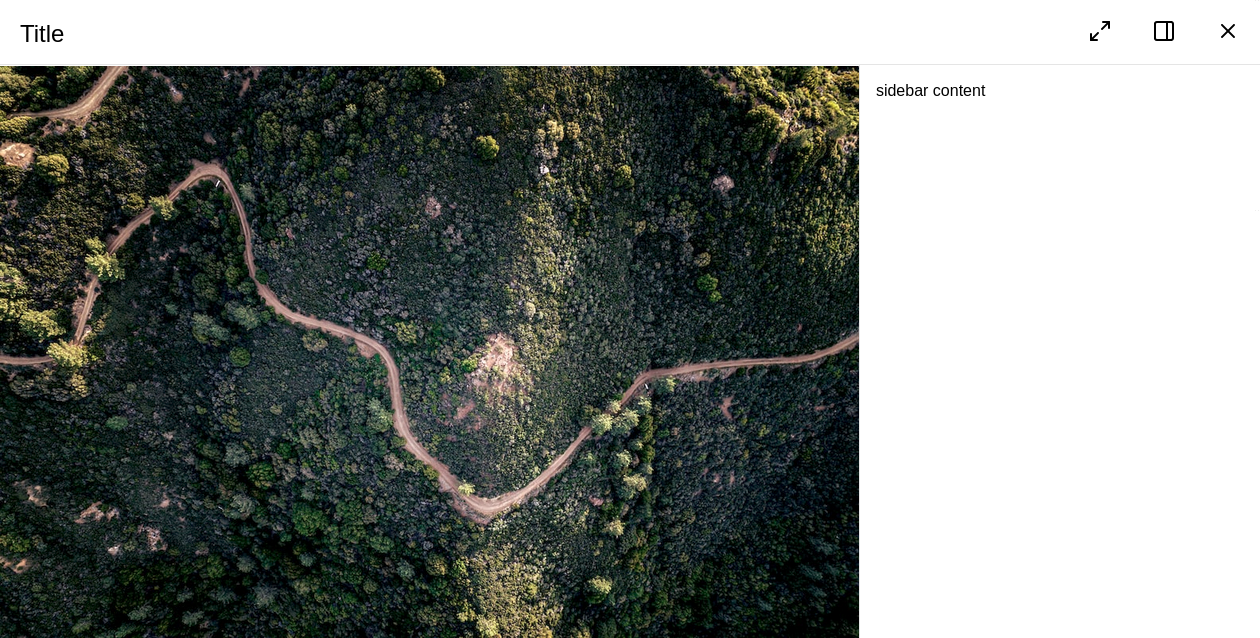
![Screenshot of anura-lightbox](https://doc.brix.ch/user/pages/03.anura/01.webcomponents/02.components/lightbox/anura-lightbox.png)

## Attributes

### asset

> **required: depends**, live: yes, default: set by a main view

Which asset (ID) to display in the lightbox. Opens the lightbox should it be closed . When using it in a slot, the parent component will inject this at runtime (most likely when the user clicks on an asset in the main view). This is set automatically by any main view you might use.

`<anura-lightbox asset="123"></anura-lightbox>`

### adapter

> **required: depends**, live: yes, default: automatic

Needed when using the lighbox without a connected main view (gallery/table/etc.). Referenced or auto-generated lightboxes will get it set by their main view.

`<anura-lightbox adapter="#my-adapter"></anura-lightbox>`

### sιdebar

> required: no, live: no, default: true

Disables the built-in sidebar meant for viewing metadata. Possible values:

- `hidden` - hides the sidebar initially, but users can still toggle it via the button in the toolbar.
- `false` - removes both the sidebar and the toggle button from the toolbar.

`<anura-lightbox sidebar="hidden"></anura-lightbox>`

### buttons

> required: no, live: yes, default: `sidebar, close`

Which buttons to show in the toolbar, and in which order. Known buttons:

- `close` - closes the lightbox. Usually specified at the very end.
- `sidebar` - sidebar toggle. Only applicable when not removed via `sidebar`.
- `fullscreen` - request the main part of the lightbox to become fullscreen.
- `prev` - go to the previous asset
- `next` - go to the next asset
- `slideshow` - starts a slideshow (automatically advance to the next asset every `sklideshow-millis`)
- `basket` - add the asset to the download basket (see [anura-basket](https://doc.brix.ch/anura/webcomponents/components/basket))
- `download` - downloads the asset in the defined [quick-download](#quick-download) format
- `share` - share link, adds the current (stateful) URL to the clipboard

`<anura-lightbox buttons="fullscreen,sidebar,close"></anura-lightbox>`

### nav-inline

> required: no, live: no, default: true

Disable the inline navigation buttons (floating over the image) by passing `false`. Consider adding `prev` and `next` to `buttons` if you do so.

`<anura-lightbox nav-inline="false"></anura-lightbox>`

### nav-click

> required: no, live: yes, default: true

Disable the click navigation on the image (clicking to the right triggers "next", on the left "previous").

> > > > > This is disabled on mobile, as it interferes with the swipe gesture

`<anura-lightbox nav-click="false"></anura-lightbox>`

### nav-keys

> required: no, live: yes, default: true

Disable keyboard navigation when lightbox is open. Mapped keys:

- `esc`, `q` - close the lightbox
- `left arrow`, `h` - go to the previous asset
- `right arrow`, `l` - go to the next asset
- `s` - toggle the **s**idebar

`<anura-lightbox nav-keys="false"></anura-lightbox>`

### quick-download

> required: no, live: yes, default: selection dialog

Which download format to use for the `download` button. The chosen format **must** be available on all assets.

If none is specified, the DAM will be queried. If only one format is available, the download will start immediately - otherwise a selection dialog is shown:
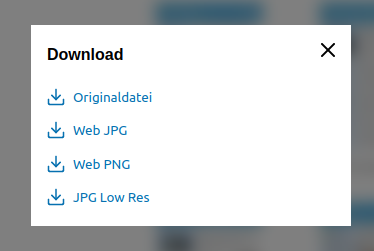
![Screenshot of the selection dialog](https://doc.brix.ch/user/pages/03.anura/01.webcomponents/02.components/lightbox/download-dialog.png)

`<anura-lightbox quick-download="Original"></anura-lightbox>`

### slideshow-millis

> required: no, live: on-start, default: 5000

How many milliseconds to wait in the slideshow until advancing to the next asset

`<anura-lightbox slideshow-millis="7500"></anura-lightbox>`

### autoplay

> required: no, live: on-change, arguments: none, default: not present

Whether `<video>`s should start playing automatically.

`<anura-lightbox autoplay></anura-lightbox>`

### title

> required: no, live: on-load, default: asset.name

Overrides the title of the lightbox - [string interpolation](https://doc.brix.ch/anura/webcomponents/components/asset#default-slot) is supported.

`<anura-lightbox title="${asset.metadata[title].value}"></anura-lightbox>`

### id

> required: no, live: on-load, default: detail

The regular `id` attribute is used to differentiate multiple lighboxes, should there be any. The primary use-case is deep links, e.g. setting the `id` to "foo" will generate a deep link "foo-asset" when the lightbox is open (*url*\#foo-asset=1234).

`<anura-lightbox id="my-lightbox"></anura-lightbox>`

### legacy-state

> required: no, live: on-load, default: -

Previous versions of anura didn't consistently differentiate instances, so deep-links may just have been rendered as `#asset=...` instead of `#instance-asset=...`. If you need to support such legacy states, set this setting to the previous anchor name, e.g. `<anura-lightbox legacy-state="asset"></anura-lightbox>`

### aria-hide

> required: no, live: on-load, default: -

When specified, an AnuraQuery will be performed and each element will get an `aria-hidden="true"` when the lightbox opens, and an n `aria-hidden="false"` when it closes again. This is mostly an a11y-feature. Example: `#main-views`;

## Slots

### buttons

> required: no, default: -

Add you own buttons to the action menu. Buttons found within are given the assets ID as a `value` for convenience, e.g.:

```html
<anura-lightbox>
    <span slot="buttons">
        <button onclick="alert('Asset '+this.value)" title="Demo">
            <anura-icon icon="alert-triangle"></anura-icon>
        </button>
    </span>
</anura-lightbox>
```

### sιdebar

> required: no, default: `anura-details`

Content of the sidebar (when enabled). When displaying an asset in the lightbox, every child node of of the sidebar is informed about the change via the `asset` Attribute.

```html
<anura-lightbox>
    <anura-details slot="sidebar" override-setting="foo"></anura-details>
</anura-lightbox>

<anura-lightbox>
    <div slot="sidebar">
        my custom sidebar
    </div>
</anura-lightbox>
```

## Parts

```html
<nav part="lightbox-nav">
  <span part="lightbox-title" id="lightbox-title">Title</span>
  <slot name="buttons" id="button-slot"></slot>
  <!-- snip, lots of <button>s like: -->
  <button part="lightbox-button lightbox-button-close">
    <anura-icon part="lightbox-icon lightbox-icon-close"></anura-icon>
  </button>
</nav>
<div part="lightbox-container">
  <main part="lightbox-main">
    <div part="embed-container"></div>
    <nav part="embed-nav">
      <button part="lightbox-button lightbox-button-embed-prev">
        <anura-icon part="lightbox-icon lightbox-icon-embed-prev"></anura-icon>
      </button>
      <button part="lightbox-button lightbox-button-embed-next">
        <anura-icon part="lightbox-icon lightbox-icon-embed-next"></anura-icon>
      </button>
    </nav>
  </main>
  <aside part="lightbox-aside"></aside>
</div>
```

## Variables

### --sidebar-width

Width of the sidebar, default is 30%

 [ ](https://doc.brix.ch/anura/webcomponents/components/gallery) [](https://doc.brix.ch/anura/webcomponents/components/map)

---

## Navigation

- Parent: [Components](https://doc.brix.ch/anura/webcomponents/components.md)
- Previous: [anura-gallery](https://doc.brix.ch/anura/webcomponents/components/gallery.md)
- Next: [anura-map](https://doc.brix.ch/anura/webcomponents/components/map.md)
