---
title: anura-details
url: 'https://doc.brix.ch/anura/webcomponents/components/details'
markdown: 'https://doc.brix.ch/anura/webcomponents/components/details.md'
lang: en
date: '2026-10-26'
description: 'Technical documentation for brix:anura webcomponents – Software developed by brix'
taxonomy:
category:
- docs
---
[](#)
[ Welcome ](https://doc.brix.ch/) [ brix:anura ](https://doc.brix.ch/anura) [ Anura Webcomponents ](https://doc.brix.ch/anura/webcomponents) [ Components ](https://doc.brix.ch/anura/webcomponents/components) anura-details
# anura-details
#### Table of Contents
- [Attributes](#attributes)
- [Slots](#slots)
- [Parts](#parts)
Shows detailed information about an asset (metadata)
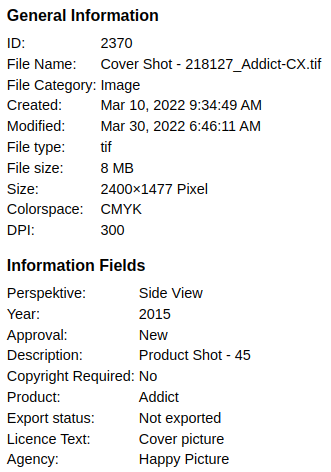
While it's made to live inside of `anura-lightbox`, you could also put it somewhere else as a standalone component.
## Attributes
### adapter
> **required: depends**, live: yes, default: -
This is set automatically when used inside an `anura-lightbox`. Otherwise you need to point it to an adapter.
``
### asset
> **required: yes**, live: yes, default: -
Asset ID of which to display metadata of. This is set automatically when used inside an `anura-lightbox` that has a sidebar. Changing this will cause the component to reload.
``
### allowlist
> required: no, live: on-load, default: -
Only show metadata listed in this (comma-separated) list. The nature of the keys is specific to the implementation of the adapter. For convenience the key is shown in the `data-id` attribute of each entry. E.g. `name,info_108,info_42`
``
### denylist
> required: no, live: on-load, default: -
Don't show metadata listed in this (comma-separated) list. **Ignored when an allowlist is defined**. The nature of the keys is specific to the implementation of the adapter. For convenience the key is shown in the `data-id` attribute of each entry. E.g. `info_113,file_size`.
``
### merge-sections
> required: no, live: on-load, default: false
Adapters can provide an arbitrary number of metadata sections (e.g. "General Info" and "Information Fields"). Set `merge-sections` to `true` in order to show all of them in a single section (called "Metadata", translation-key: `metadata`).
``
### line-clamp
> required: no, live: on-load, default: 300
Long text fields get clamped by default, use this to set after how many characters this should trigger, or set it to `0` to disable.
``
### nl2br
> required: no, live: on-load, default: off
Some DAMs send a mix of `
` and `\n` as line breaks. Turn this on to try and normalize them to `
`.
``
### folded
> required: no, live: on-load, default: -
A comma-separated list of detail sections that should be folded by default. You can get the ID of the section from its `data-id` attribute. E.g. `technical_information,meta_data`.
Note that sections that have been folded manually by the user will also be persisted in this property, but only in the current session.
``
### relations
> required: no, live: on-load, default: -
When set, a second tab will appear that contains related assets of requested relation types (if your DAM supports that)
- CELUM: use either the id (found in asset-relations.xml, e.g. `languageVariant`) or the numeric ID (query or network-log [asset.do?relations=-1](https://doc.brix.ch/anura/api#relations-1), e.g. `9`)
- you may also use an artificial construct `noderef_{infofield-id}` to pretend that assets with the same value in the given `infofield-id` are related, e.g. `noderef_123` for field 123.
- Sharedien: use the identifier (Settings, Configuration, Relation Types, first column), e.g. `Translation`
- others: doesn't exist as a concept (at the time of writing)
``
### with-parents
> required: no, live: on-load, default: -
When set, the detail page will load the assets parent node/folder/categories and display them as metadata. When you have an `anura-tree`, it will render them as buttons to navigate to them.
``
## Slots
- **header** - content that should appear before the metadata
- **footer** - content that should appear after the metadata
## Parts
```html
```
[ ](https://doc.brix.ch/anura/webcomponents/components/date) [](https://doc.brix.ch/anura/webcomponents/components/filters)
---
## Navigation
- Parent: [Components](https://doc.brix.ch/anura/webcomponents/components.md)
- Previous: [anura-date](https://doc.brix.ch/anura/webcomponents/components/date.md)
- Next: [anura-filters](https://doc.brix.ch/anura/webcomponents/components/filters.md)