---
title: anura-date
url: 'https://doc.brix.ch/anura/webcomponents/components/date'
markdown: 'https://doc.brix.ch/anura/webcomponents/components/date.md'
lang: en
date: '2026-10-26'
description: 'Technical documentation for brix:anura webcomponents – Software developed by brix'
taxonomy:
category:
- docs
---
[](#)
[ Welcome ](https://doc.brix.ch/) [ brix:anura ](https://doc.brix.ch/anura) [ Anura Webcomponents ](https://doc.brix.ch/anura/webcomponents) [ Components ](https://doc.brix.ch/anura/webcomponents/components) anura-date
# anura-date
#### Table of Contents
- [Attributes](#attributes)
- [Events](#events)
- [Parts](#parts)
```html
```
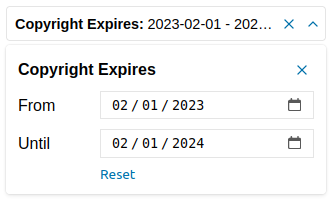
A date range selector
## Attributes
### adapter
> **required: yes**, live: no, default: -
With which adapter to talk to (to load the values from)
``
### source
> **required: yes**, live: on-load, default: -
What metadata field to query in order to get the possible values from. The value type will depend on the adapter that you're using (usually an ID or a UUID)
``
### min
> required: no, live: yes, default: -
Minimum date available, applied to the *from* field
``
### max
> required: no, live: yes, default: -
Maximum date available, applied to the *to* field
``
### decade-min
> required: no, live: yes, default: -
Activated the *decade* mode - minimum decade date available, applied to the *decade* field
``
### decade-max
> required: no, live: yes, default: current year
Maximum date available, applied to the *decade* field
``
### value
> required: no, live: set by component, default: -
The value deriving from both date inputs in the form of *from,to*, e.g. `2023-01-01,2023-12-31`. Can be used to set an initial value, but will only be written to by the component afterwards.
### type
> required: no, live: set by component, default: -
The type of field that should be affected. This will be set by your adapter and is specific to the implementation. Don't touch this.
### state
> required: no, live: on-load, default: true
Whether the date fields should maintain their state. This will use the components `id` to differentiate itself from other components. If you don't provide an ID, a hash of the component will be used. Set it to `false` to not keep any state at all.
``
### drill-down
> required: no, live: on-load, default: false
When enabled, these date values will become clickable in ``, whereafter this field will be filled with said date, and trigger a search. Basically, this imitates the behaviour of `` for drill-down searches, but for date fields. It's off by default, as it makes litte sense for things like a description.
``
You may also target a different field by setting the field's ID as:
``
## Events
### change
> standard change event
Fired when the user selects values in the dropdown
## Parts
```html
```
[ ](https://doc.brix.ch/anura/webcomponents/components/basket) [](https://doc.brix.ch/anura/webcomponents/components/details)
---
## Navigation
- Parent: [Components](https://doc.brix.ch/anura/webcomponents/components.md)
- Previous: [anura-basket](https://doc.brix.ch/anura/webcomponents/components/basket.md)
- Next: [anura-details](https://doc.brix.ch/anura/webcomponents/components/details.md)