---
title: 'Faceted Search'
url: 'https://doc.brix.ch/anura/backend/faceted-search'
markdown: 'https://doc.brix.ch/anura/backend/faceted-search.md'
lang: en
date: '2026-10-26'
description: 'Technical documentation for brix:anura Back-end "Faceted Search" – Software developed by brix'
taxonomy:
category:
- docs
---
[](#)
[ Welcome ](https://doc.brix.ch/) [ brix:anura ](https://doc.brix.ch/anura) [ Back-end (CELUM Plugin) brix:anura ](https://doc.brix.ch/anura/backend) Faceted Search
# Faceted Search
Anura offers faceted search since version 2.6. In order for this to work, you'll need to add the [anuraSolr](https://mediahub.brix.ch/main/opennodeview.do?tab=transfertab&nodeId=6485)-{[version](https://doc.brix.ch/celum_extensions#naming-scheme)}.jar to `{home}/appserver/lib` and configure your SOLR server accordingly. Anura requires an extra index per referenced CELUM user, as permissions are not reflected in the search index, so we have to maintain a separate index per user that reflects what that user can see.
### Compatibility Matrix
| AnuraSolr | Anura | CELUM 6 | CELUM 5.13.x | CELUM 5.12.x |
|---|---|---|---|---|
| 1.0 - 1.4 | 2.5 - 2.6.13 | | 5.13.0 - 5.13.3 | 5.12.3 (+) |
| 1.0 - 1.4 | 2.6.14 - 2.7.6 | | 5.13.3 | |
| 1.5 | 2.7.9 and above | | 5.13.4 (+) | |
| 1.6 | 2.8.0 and above | 6.1 (+) | - | - |
| 1.6.1 and above | 2.8.1 and above | 6.4 (+) | - | - |
| 1.7 and above | 2.9 | 6.8 (+) | - | - |
| 1.10 and above | 3.4 | 7.1 (+) | - | - |
### Installation
#### In the vendor's cloud
> > > > If you are in their "pipeline hosting", you should be able to edit `customer-properties.yaml` and add (replace `1` with the actual userId):
```yaml
solr:
customCores:
- assetsAnura1
```
> > > > ... however, this no longer seems to work reliably, last time I had open a ticket to get them to do it.
#### On your own server
1. go to *{home}*/searchserver/solrhome
2. download the [solr core template](https://doc.brix.ch/anura/backend/faceted-search/./assetsAnura1.zip) and extract it. **Updated for 6.20** - if you come from an earlier version, you need to replace it.
3. rename it assetsAnura*{userId}* (e.g. *assetsAnura42* if your anura-user has the ID 42 - check [anura.*$i*.userId](#anura-1-userid)).
The file assetsAnura{userId}/core.properties must be also adjusted as follows: `name = assetsAnura{userId}`
> > > Make sure the directory is writable by the tomcat user, otherwise the indexing will fail later on
4. **If your solr data directory uses a custom location**: Change the `dataDir` property in the copied *assetsAnura{userId}/conf/solrconfig.xml* to `${solr.assetsAnura{userId}.data.dir:}` (e.g. `${solr.assetsAnura42.data.dir:}`)
> > > This is only the case if you pass *-Dsolr.assets.data.dir=...*, so you'll need to change the *dataDir* property in the copied assetsAnura*{userId}*/conf/solrconfig.xml to something else, e.g. `${solr.assetsAnura42.data.dir:}` so you could pass *-Dsolr.assetsAnura42.data.dir=...* - otherwise it tries to write to the existing asset core data directory and fails.
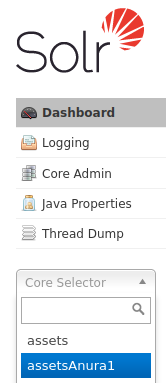
5. Restart the search server. In its web-UI, you should now see the new core in the "Core Selector" dropdown.
6. **BREAKING CHANGE** as of 6.17: You need to go and whitelist the SOLR URL: `sdk.property.whitelist=search.serverUrl` (add `search.serverUrl`, others might be present already)
7. Configure the [facetProvider](#anura-1-facetprovider)-property (e.g. `anura.1.facetProvider=anuraSolrSearchRequestHandler`) and restart the app server.
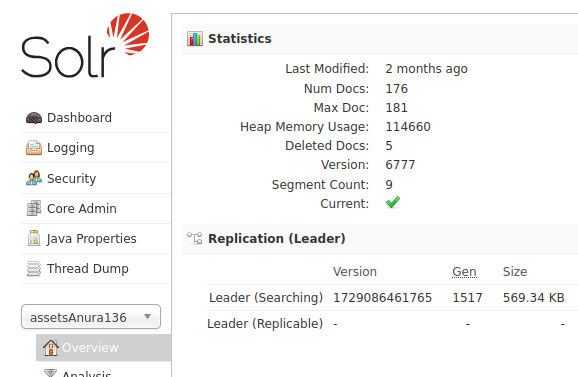
8. In CELUM, go to *Administration > System Tasks > Anura* and start the *Recreate facet search index* task. Because there are no permission events in the SDK, you may also need to do that when you change the anura user's role(-assignments). You should now see some documents in your solr-core (Num Docs):
9. You can now use [facets](https://doc.brix.ch/anura/webcomponents/adapters#facets) in the frontend (previously `facets: true` in [anuraSearch](https://doc.brix.ch/anura/frontend/navigation#search))
#### With Docker
You should be able to follow the same steps as above, however you need to mount the custom solr config into the container (last line here):
```yml
contenthub-search:
# ... snip ...
volumes:
- ./data/searchindex:/opt/solr/server/solr/celum-data:rw
- ./logs/search:/var/solr/logs:rw
- ./home/searchserver/solrhome/assetsAnura1:/opt/solr/server/solr/celum/assetsAnura1:rw
```
Repeat the last line for every user that needs a custom solr config (updating the trailing user ID accordingly).
### Properties
*To be configured in {home}/appserver/conf/custom.properties*
##### anuraSolr.solrUrl
> type: String, **required: yes**, default: ${search.serverUrl}
The URL of the SOLR server. Defaults to the one CELUM is using.
##### anuraSolr.leadingWildcardSearch
> type: boolean, required: yes, default: ${search.enableLeadingWildcardSearch}
Whether to use leading wildcard search. This **must** match the settings you use in CELUM, so the default is `${search.enableLeadingWildcardSearch}`
##### anuraSolr.useSDKForFulltextSearch
> type: boolean, required: no, default: true
Set this property to `true` to use the SDK for fulltext search. This guarantees correct asset counts, but can be slow when there are a lot of assets.
##### anuraSolr.facetLimit
> type: boolean, required: no, default: -1
Set this property to another value 'x' to get only top 'x' facet result per faceted field. Not recommendet.
##### anuraSolr.translateFilterToSolr
> type: boolean, required: no, default: false, status: beta
When using [globalFilter](https://doc.brix.ch/anura/backend#anura-1-global-filter), translate the filter into a SOLR native query instead of using the SDK. This is a lot faster, but not every query is supported yet. Known supported queries: and, or, asset type, checkbox, dropdown, node refs and node assignments. Others can be implemented on request.
##### anuraSolr.cronExpression
> type: String , required: no, default: -
A cron expression (quartz) to run the recreation task automatically, e.g. `0 0 0 * * ?` for midnight.
##### anuraSolr.cronExpressionCleanUpEntries
> type: String, required: no, default: 0 0 0 ?, since: 1.7
A cron expression (quartz) to run the cleanup task, i.e. remove expired assets from the index.
##### anuraSolr.threadPoolSize
> type: int , required: no, default: 10
Size of the threadpool to run the re-indexing with.
##### anuraSolr.reindexPageSize
> type: int , required: no, default: 200
The fetch-size used then re-indexing.
##### anuraSolr.reindexOnly
> type: List of user IDs, required: no, default: -
When reindexing, only consider the provided user IDs - otherwise all are considered.
### Troubleshooting
##### No results or all options gone
When you get either no results or all the faceted options get removed instantly after loading the page, check:
- that the SOLR core was actually created successfully - see if it exists in the "Core Selector" on the left side of the SOLR UI. Observed mistakes include
- Incorrect, missing or non-readable configuration files (check solr log)
- Multiple cores using the same `dataDir` (see above)
- the `dataDir` is not writable to the SOLR user
- you have a current version of the conf/schema.xml and aren't missing any `docValues` (see above)
- if the core (assetsAnura*123*) has any assets in it. Go to Query, set *q* to `*:*` and hit *Execute Query*. Response should return a `numFound` > 0. If not, check the *Anura: recreate facets* tasks (or the log) for error messages.
- if only some fields seem to be missing in the facet response it's probably a permission issue. To see if any values are indexed for a particular field, e.g. NodeRef 360, query for `nodeBackedPathIds_360:*` and see if you get any results (depending on the field type the key will be different, e.g. `customFields__`. If the query yields no results, double-check the users permissions and re-index.
##### Textfield type-ahead suggestions are backwards
In your anura core's conf/schema.xml, remove the following line:
```xml
```
... and recreate the search index.
##### unknown field 'path'
Since 6.14 a yet unknown change has been made to the schema.xml's *path* field. Until a better fix is available, add
```xml
```
below the field "containers" in your copied schema.xml.
##### write.lock
> assetsAnuraX: org.apache.solr.common.SolrException:org.apache.solr.common.SolrException: /opt/solr-9.6.1/server/solr/celum/assetsAnuraX/data/index/write.lock
This looks like an errant write.lock, but if removing it and restarting don't help, it is more likely that you have permission issues -> `chown -R solr:solr assetsAnuraX`
### Release notes
##### 1.0.0
- Initial release
##### 1.1.3
- Improved error handling
##### 1.1.9
- Improved indexing
##### 1.2
- Added nodereference and/or logic
##### 1.3
- Improved indexing performance
##### 1.4
- Extra version for older CELUM with solr 4
- Added CELUM-Filter translation
##### 1.5
- Implemented a cleanup task to remove assets from the index, that no longer exist, but have been missed to be deleted
##### 1.6
- Added support for the new filters
##### 1.7
- Bump minimal CELUM version to 6.8
- Support new text search behavior
##### 1.8
- new approach for full-text search (performance)
##### 1.9
- Compatibility with 6.20
##### 1.10
- Compatibility with 7.1
[ ](https://doc.brix.ch/anura/backend) [](https://doc.brix.ch/anura/backend/celum-token-verifier)
---
## Navigation
- Parent: [Back-end (CELUM Plugin) brix:anura](https://doc.brix.ch/anura/backend.md)
- Next: [CELUM Token Verifier](https://doc.brix.ch/anura/backend/celum-token-verifier.md)